
Re-Organizing the Homepage Widgets
Support Area › Forums › Forward › Re-Organizing the Homepage Widgets
- This topic has 7 replies, 2 voices, and was last updated 8 years, 5 months ago by
Bill Robbins.
-
AuthorPosts
-
November 15, 2015 at 15:28 #33846
Peter Roach
ParticipantHi Bill –
I am trying to get our homepage into to columns with the Post being on the Left and about 2/3 of the space, then have our events calendar and email sign-up widgets be on the Rightside occupying about 1/3 of that space.
How do I find out the size of widgets or adjust there size to ensure that our homepage is displayed properly on mobile and PC browser sessions?
Thanks,
PRNovember 16, 2015 at 09:36 #33856Bill Robbins
ModeratorGood Morning Peter,
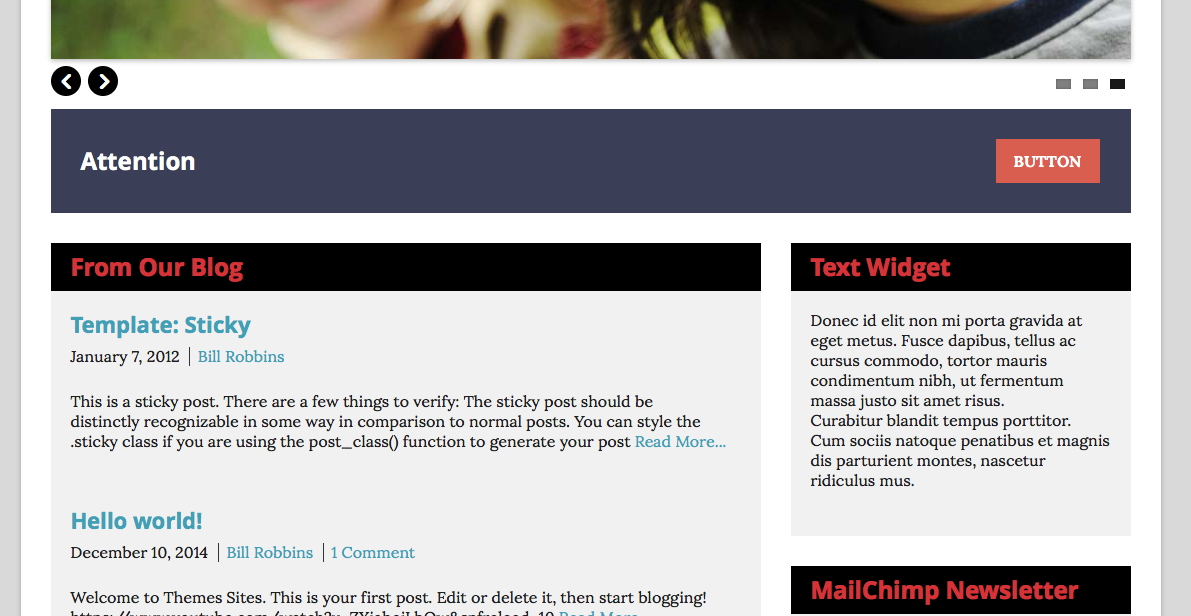
Looking at your front page, I would expect it to layout with the attention widget at the top followed by the featured posts on the left and other widgets on the right. I’ve attached a screenshot of that from my development site for comparison.
Let’s do this to troubleshoot. Disable every plugin that’s on the site. Then clear out your browser’s cache and visit the front page again. See how it lays out then. If it works as expected, then turn the plugins on, one by one until it stops then you’ll know where the conflict is.
If the layout doesn’t snap back after disabling all the plugins, leave them turned off and let me know. That’ll make debugging much easier for me.
Thanks,
BillNovember 16, 2015 at 15:48 #33866ParticipantThanks Bill –
I found that the conflict comes with the Time.ly calendar add-on. We would like to use this Events calendar and have added the Extended Views feature. When we add the Extended Views, that is when the widgets fail to move up to the right. Can you add this plugin and then the extended views to see if you can reproduce? It would be cool if we could find a template fix.
Thanks, PR
November 16, 2015 at 16:18 #33867ModeratorTimely has a long history of questionable coding. I always recommend The Events Calendar from Modern Tribe in part because it is very well coded and conforms to WordPress best practices.
Would you mind flipping that option back on again so I can see if I can spot what to do there?
November 16, 2015 at 16:59 #33869ParticipantI have re-enabled that code. We like to posterview with the Extended views. Thanks for helping out. PR
November 16, 2015 at 17:14 #33870ModeratorPeter,
Looks like they are loading a duplicate version of the masonry javascript library that’s already part of the WordPress core. Try doing this:
- Go to the Appearance section in your WordPress dashboard and choose Edit.
- From the list of files on your right, choose scripts.php and find this line:
wp_enqueue_script('jquery-masonry');and delete it.
- Save your changes.
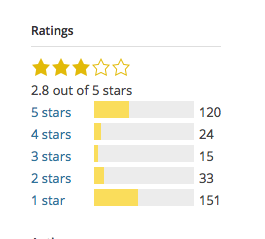
Hopefully that will help out. I truly hate this plugin. I’ve considered several times making an exclusion in our support terms that no help will be offered if using this plugin. It’s that troublesome. Any plugin that has more one star ratings than five star ones with over 100,000 installs should send up red flags.
Attachments:
November 17, 2015 at 11:21 #33882ParticipantThanks Bill!
That did the trick – I had to open the editor and the go to the parent Theme folder. I commented out that line and Volia! It seems like a great majority of the work in the WordPress space is handling disputes between themes and plugins!
Best,
PRNovember 17, 2015 at 11:28 #33883ModeratorGlad that did the trick.
Sadly, there is a great deal of difference in the skill level of various developers. The WordPress.org repository of plugins isn’t checked for quality or functionality, but just for basic safety.
That sometimes leads to plugins that are awful being widely used. This plugin took the same branding as a popular SEO plugin which helped them take off since users recognized the name, even though they weren’t related.
What we really need is a directory of quality checked plugins. That would help us all.
Take care
-
AuthorPosts
- The topic ‘Re-Organizing the Homepage Widgets’ is closed to new replies.
