
homeblock portafolio gallery
Support Area › Forums › Selfie › homeblock portafolio gallery
- This topic has 7 replies, 2 voices, and was last updated 8 years ago by
Bill Robbins.
-
AuthorPosts
-
April 18, 2016 at 14:19 #36405
pablo talhouk
ParticipantHi Bill,
Im triying to make a portafolio home block as a image gallery. it works ok in full screen, but when i resize the window, it make a lot of blank spaces in bweteen the images.
Any way to fix this?
I also tried to put all the images in the home block content, but i cant see all the images.
Please help!
Best regards,
Pablo
April 18, 2016 at 14:34 #36407Bill Robbins
ModeratorHi Pablo,
Good question. I don’t know that Selfie will be the right theme for you here. It has a pretty specific layout built in — large hero with a small amount of text on top of each section. Galleries were intended to be included via the plus sign in the bottom right of each section. Once you get outside of that Selfie may not be the right tool to make what you have in mind.
I would look at either Finesse or Mise En Place and see if one of those won’t work for you. Their layouts are as rigid as Selfie is.
Let me know if you run into any trouble there.
Thanks,
BillApril 18, 2016 at 17:16 #36411Participantthanks for your answer… any way did you see the results? it´s pretty good and i like it. i just need to fix that little issue (the white space between the images)
please look at this: http://www.talhouk.cl/portfolio/osorno/
thank´s in advance.
April 18, 2016 at 17:40 #36415ModeratorGood follow up question. The white space is there because each home block has to be 100 of the width and height of the browser window. Since the image in the content isn’t the same size as the browser window, you’ll end up with empty space between them. It’s a very core part of the theme and not something that is easy to overcome.
If you really want to stick with it, here is a possibility. Create a page for your home page that doesn’t use the home page template. Insert your images into it like you’d like them to appear. We could likely restyle that page so it just has the images without the white spaces between them a bit more easily than the home page. Never tried that before, but I think that would have a better chance at working. It’s still a bit like using a hammer to drive a screw instead of a screwdriver though.
April 19, 2016 at 08:09 #36419Participantthank`s bill, i understand (and agrre with you).
i`ll try another way, maybe with a plugin….
thanks!
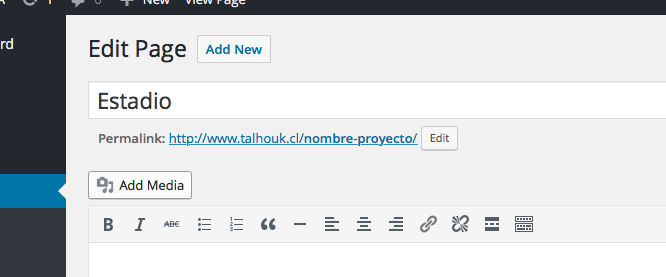
April 19, 2016 at 08:28 #36420ParticipantApril 19, 2016 at 08:50 #36423ParticipantHi Bill, in the same follow, do you know why the “add media” buttom in the pages tab dosen´t work?
i pussh it, and it dosent make anything.
thanks in advance.
April 19, 2016 at 09:07 #36428ModeratorHi Pablo,
It could be a javascript error that’s keeping that from working as expected. You might try disabling all plugins then clearing your browser’s cache. Then see if it works again. If it does, then turn the plugins back on, one by one checking after each one. If it stops again after activating one, you’ll know where the trouble is.
Take care,
Bill -
AuthorPosts
- The topic ‘homeblock portafolio gallery’ is closed to new replies.
